

401(k) Auto Rebalance: How Automatic Rebalancing Works and Its Limits
How a 401(k) auto-rebalance feature works
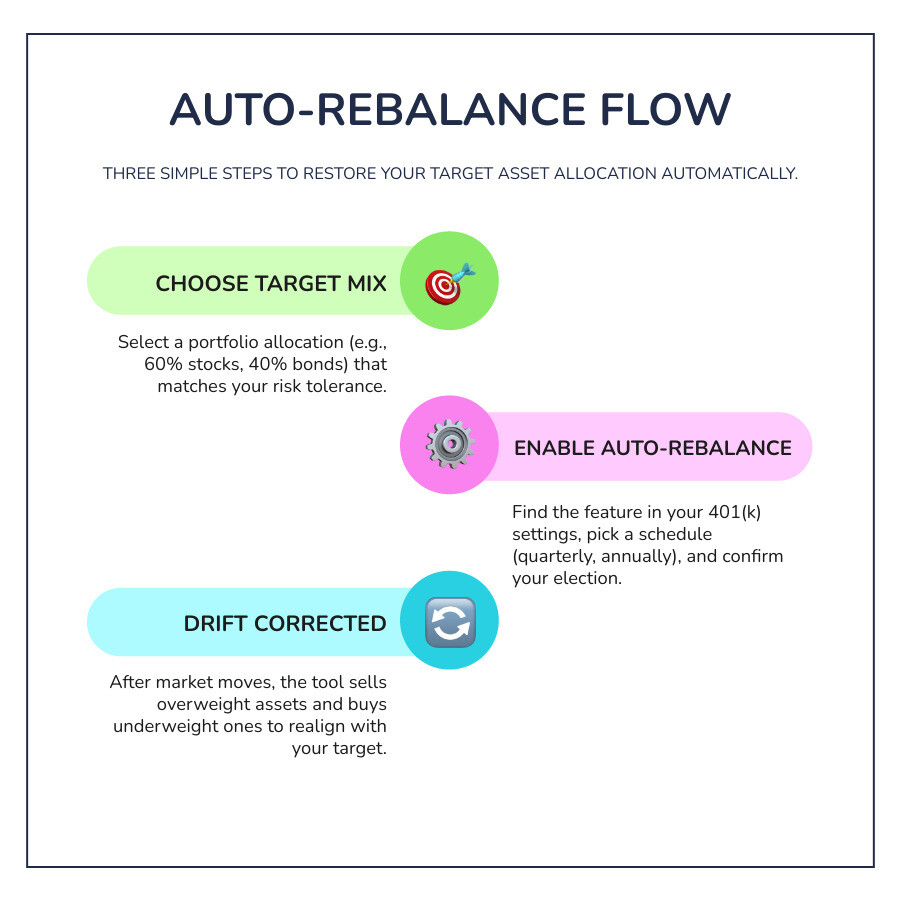
A 401(k) auto rebalance feature is a plan option that can help you maintain a chosen investment mix over time. To set up automatic rebalancing, choose a target mix of investments, then look for a rebalancing option in your 401(k) account settings if your plan offers one. Select an available schedule, confirm which investments it covers, and check whether new contributions use the same mix. Your plan’s Summary Plan Description can help you confirm the rules.
As markets move, your investments can drift away from the mix you chose. Auto-rebalancing brings them back to that target, which may help keep your risk in line with your plan. It does not decide whether your target still fits your needs or adjust it in response to market volatility. We’ll cover those limits and your other options below.
What Is 401(k) Auto Rebalance and Why We Believe it is Necessary?

When you construct your retirement portfolio, you choose an initial asset allocation across stocks, bonds, and other asset classes based on your personal time horizon and comfort with risk. Over time, different investments grow at different rates. Strong equity market runs cause stock holdings to expand, while conservative holdings like fixed income may grow more slowly or decline.
This divergence is known as portfolio drift. When your equities surge, they naturally take up a larger percentage of your overall balance. A portfolio that started as a balanced mix of 60% stocks and 40% bonds can silently transform into a 75% stock and 25% bond allocation after an extended market rally. Without periodic intervention, your account can carry far more risk than you originally planned.
Understanding what every investor needs to know about rebalancing a 401(k) starts with recognizing that rebalancing is commonly used as a risk-management habit, not an attempt to time the market. A 401(k) auto rebalance feature handles this process mechanically by periodically buying and selling underlying funds within your account to bring your balances back to your chosen targets.
Rebalancing to Manage Risk vs. Chasing Returns
It is common to mistake rebalancing for a return-enhancement tool. In reality, rebalancing is designed primarily to manage your exposure to risk. When you rebalance, the mechanism systematically sells portions of assets that have appreciated and directs those proceeds into underweight assets.
This process often enforces a disciplined habit of selling high and buying low across asset classes. However, rebalancing does not guarantee a profit, nor does it protect against investment losses during broad market downturns. All investing involves risk of loss, including the possible loss of principal. What rebalancing aims to accomplish is keeping your level of return volatility aligned with your original risk tolerance so you are not caught off guard by unexpected market swings.
Tax-Advantaged Rebalancing Rules
In a taxable brokerage account, selling appreciated investments often triggers capital gains taxes. Fortunately, workplace retirement plans operate under distinct tax rules. Within a qualified defined-contribution plan like a 401(k), asset exchanges, reallocations, and rebalancing trades do not trigger current income taxes or capital gains taxes.
According to the IRS 401(k) Resource Guide, taxes generally apply only when you take an actual distribution or withdrawal from the plan, not when you trade between funds inside the account. This tax-deferred environment allows you to restore your target asset allocation without generating an immediate tax bill.
Common Approaches and Timing for Rebalancing
There are several standard ways to manage portfolio drift. Whether handled by an automated tool or executed manually, rebalancing strategies generally follow time intervals, percentage thresholds, or a combination of both.
| Rebalancing Method | How It Works | Key Advantages | Potential Trade-Offs |
|---|---|---|---|
| Calendar-Based | Adjusts holdings on a fixed schedule (e.g., quarterly or annually). | Simple to automate; requires minimal monitoring. | May rebalance when drift is negligible, or delay action during high volatility. |
| Threshold-Based (Drift) | Triggers trades only when an asset drifts by a set percentage (e.g., ±5%). | Avoids unnecessary trades; responds directly to market movements. | Requires ongoing monitoring; rarely supported as an automated tool in standard 401(k) plans. |
| Hybrid | Reviews holdings on a calendar schedule, but only trades if drift exceeds a threshold. | Balances discipline with trade efficiency. | May require manual calculation or professional oversight. |
Choosing a Calendar Schedule for 401(k) Auto Rebalance
Most workplace retirement platforms that offer built-in automation utilize a calendar-based schedule. You can typically select quarterly, semiannual, or annual rebalancing intervals.
Deciding whether to rebalance your 401(k) mid-year or stick to an annual review depends on your personal preferences and the specific investment options in your plan. Research generally suggests that reviewing your portfolio once every three to six months captures most risk-management benefits without creating excessive account turnover.
Threshold and Drift-Based Triggers
Threshold-based rebalancing sets specific guardrails around your asset classes. For example, if you set an absolute tolerance band of 5%, an asset class with a 50% target would only trigger a trade if its allocation drifted below 45% or above 55%.
Relative thresholds adjust these bands based on the initial size of the position, which can be useful for smaller holdings like emerging markets or small-cap funds. While threshold rebalancing is widely regarded as an effective risk-management framework, standard recordkeeper tools usually lack the ability to set dynamic drift triggers automatically.
Step-by-Step: How to Enable Automatic Rebalancing in Your Account
If your employer’s plan provides an automated tool, turning it on typically takes only a few minutes through your online benefits portal.

- Log in to your account: Access your 401(k) recordkeeper portal and navigate to the investment management or portfolio settings section.
- Review your target allocation: Confirm that your chosen percentage targets across each fund match your current goals and sum to 100%.
- Locate the rebalance tool: Look for options labeled “Automatic Rebalance,” “Rebalance Account,” or “Auto-Rebalance Preferences.”
- Select your frequency: Choose how often the system should adjust your holdings (such as quarterly, semiannually, or annually).
- Confirm contribution settings: Check whether the rebalance applies only to your existing balance or also updates your ongoing payroll deductions.
- Review and submit: Check the preview summary for accuracy and confirm your election.
Note: Available features vary widely by employer and recordkeeper. Always consult your plan’s Summary Plan Description (SPD) to verify specific plan rules and transfer limitations.
Managing Current Balances vs. Future Contributions
A common point of confusion is the difference between your existing account balance and your future contribution elections. Your existing balance is the money already accumulated in your plan, while future contributions represent the new dollars deducted from each paycheck.
Some recordkeepers allow you to direct new contributions into a different set of funds than your accumulated balance. However, if your automated tool resets your entire portfolio back to a single target model, it may overwrite these separate elections. To keep your overall strategy aligned, review that your ongoing contribution instructions match your intended target asset allocation.
Some Key Limits and Alternatives to Built-In Automatic Tools
While built-in auto-rebalance tools provide convenience, they operate with notable constraints. Understanding these trade-offs helps you determine whether a basic automated tool is sufficient for your situation.
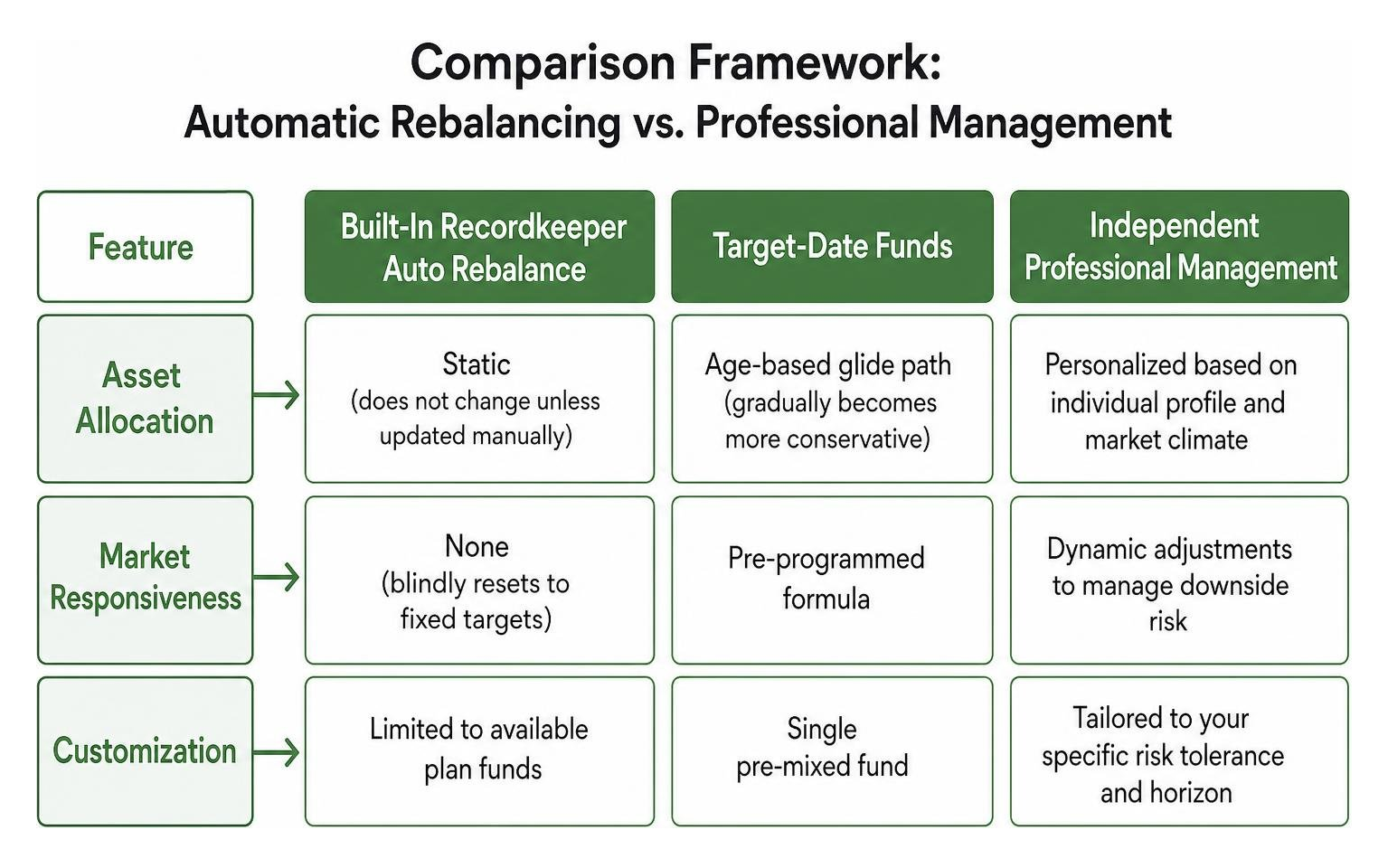
| Feature | Built-In Recordkeeper Auto Rebalance | Manual Rebalancing | Independent Professional Management |
|---|---|---|---|
| Asset Allocation | Static (does not change unless updated manually) | Set by participant; requires ongoing manual calculations | Personalized based on individual profile and market climate |
| Market Responsiveness | None (blindly resets to fixed targets) | Dependent on participant monitoring and execution | Dynamic adjustments to manage downside risk |
| Customization | Limited to available plan funds | Full manual control over available plan fund choices | Tailored to your specific risk tolerance and horizon |
| Account Oversight | Automated computer rule | Self-directed participant discipline | Fiduciary human adviser oversight |
Limitations of a Basic 401(k) Auto Rebalance Tool
The primary limitation of a standard plan auto-rebalance feature is that it is entirely static. The tool blindly resets your holdings back to your chosen numbers on a set calendar date, regardless of broader economic conditions, interest rate shifts, or changing personal circumstances. It cannot evaluate whether your portfolio is properly diversified or if your target mix is still appropriate as you approach retirement.
When considering what to do with your 401(k) during market volatility, a static tool can re-execute your pre-set percentages. It offers no proactive downside-risk control and cannot adjust allocations to protect against specific market headwinds.
Professional Account Management and Dynamic Oversight
For participants who want a more customized approach without having to manage trades themselves, professional account management offers an alternative. Rather than relying solely on a rigid, calendar-driven reset, independent fiduciary management provides personalized oversight.
Learning how professional 401(k) management may help account performance involves understanding the value of active oversight. A dedicated fiduciary adviser can review your workplace plan quarterly, making personalized adjustments designed to manage downside risk and optimize your available investment lineup while keeping your funds securely inside your existing workplace plan.
Some Key Takeaways
- Maintains Your Target Risk: Automatic rebalancing periodically resets your portfolio to your chosen asset mix, helping prevent unintended risk caused by equity drift.
- Tax-Deferred Adjustments: Trading funds inside a traditional or Roth 401(k) does not trigger capital gains taxes or immediate taxable events.
- Static Functionality: Built-in recordkeeper tools follow rigid schedules and do not dynamically adjust your strategy for changing market environments or life stages.
- Check Plan Rules: Feature availability, transfer limits, and contribution election alignments vary, so verify details in your plan’s Summary Plan Description.
Frequently Asked Questions About 401(k) Rebalancing
Does enabling automatic rebalancing trigger taxes or penalties?
No. Rebalancing trades executed within a qualified 401(k) plan are not considered taxable distributions. Because the funds remain inside the tax-advantaged account structure, buying and selling investments to restore your allocation does not generate capital gains taxes or IRS early withdrawal penalties. Taxes and potential penalties generally apply only when you take money out of the plan via a distribution.
How does automatic rebalancing differ from professional account management?
A standard auto-rebalance tool is a basic software setting that mechanically resets your portfolio back to fixed, static percentages on a set calendar date. It does not evaluate your financial goals or market conditions. Professional account management involves an independent fiduciary adviser who actively reviews your portfolio, evaluates fund quality within your plan, and makes customized quarterly adjustments tailored to your specific risk tolerance and retirement horizon.
Are there fees for using an auto-rebalance feature?
Most major 401(k) recordkeepers offer basic automatic rebalancing tools at no additional charge. However, individual plans may have specific rules regarding trade frequency. For example, some plans allow a set number of free fund transfers per year and may assess a small administrative fee if that threshold is exceeded. Review your plan’s fee disclosures and Summary Plan Description to confirm your plan’s specific terms.
Conclusion
Keeping your retirement savings properly balanced can be essential for managing risk as financial markets fluctuate. While a built-in 401(k) auto-rebalance feature provides a convenient, hands-off way to maintain a static asset allocation, it cannot adjust to changing market conditions or ensure that your target mix remains suitable for your evolving retirement timeline.
If you are age 40 or older and want a personalized approach to your workplace retirement plan, our team at 401(k) Maneuver is here to help. We provide independent, fiduciary account management designed to help manage downside risk, review fund options, and execute quarterly adjustments directly within your existing plan.
To discuss your account with an adviser, see how our professional management process works.
Disclosure: 401(k) Maneuver is a business name of Royal Fund Management, LLC, an SEC-registered investment adviser. This article is provided for educational and informational purposes only and does not constitute personalized investment, legal, or tax advice. Investing involves risk, including the possible loss of principal. Asset allocation, diversification, and portfolio rebalancing strategies do not guarantee a profit or protect against loss in declining markets. Consult with a qualified financial adviser, CPA, or attorney regarding your specific situation before making financial decisions.